Sales Attributed to Marketing
Sales Attributed to Marketing shows the sales from orders that carry a UTM tag, period by period. It tells you how much of your revenue came from links you tagged.
How It’s Calculated
An order counts here when Shopify recorded at least one UTM tag on it: a source, medium, campaign, term or content value. Shopify takes the tags from the customer’s last visit before the order. An order with no tag isn’t in this report at all, so use Total Sales for the whole picture.
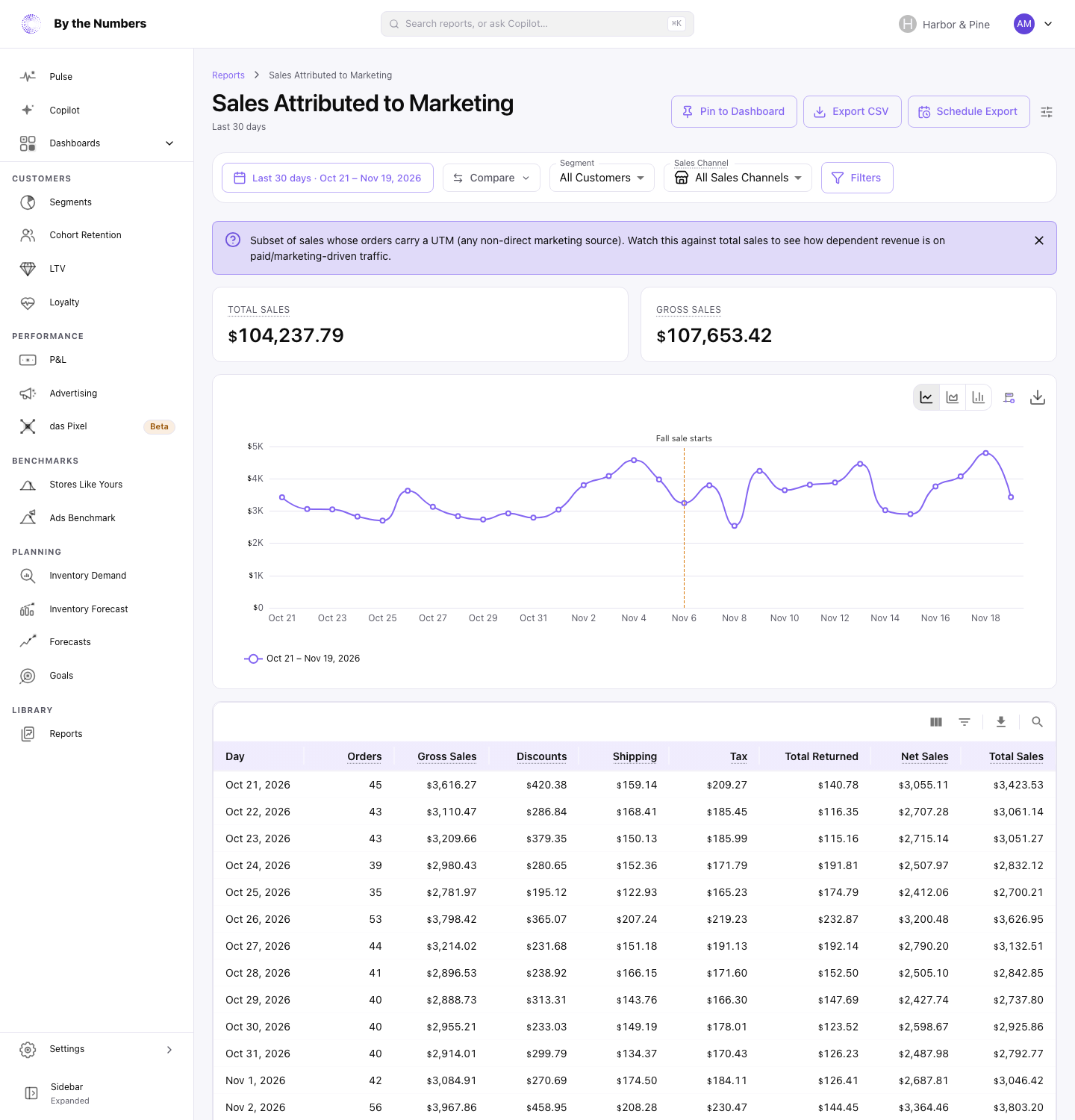
The cards at the top show Total Sales and Gross Sales for the date range. With a comparison on, each card also shows the change from the comparison period. The chart draws Total Sales for each period, and the table has one row per period.
The columns are the same as in Total Sales: Orders, Gross Sales, Discounts, Shipping, Tax, Total Returned, Net Sales and Total Sales. The only difference is which orders are in them.
The length of the date range sets how long a period is:
- 3 days or less: one row per hour
- Up to 93 days: one row per day
- Longer: one row per month
What Counts
- Only orders Shopify can tie to a visit to your online store carry tags. Point of sale, phone and draft orders have none.
- By the Numbers needs permission to read Shopify’s marketing events to record tags. Orders imported without it carry none.
- A sale counts on the day the order was placed. A refund counts on the day it was made, and only for orders with a tag. Refunds on orders placed more than 2 years before the start of the date range aren’t counted.
- Orders that were canceled, or whose payment was voided or expired, don’t count.
- Days follow your store’s time zone, and every amount is in your store’s currency.
- Sales Channel, Segment and Filters narrow the report down.
What Good Looks Like
Compare Total Sales here with Total Sales on the Total Sales report for the same dates. The share that carries a tag shows how much of your revenue comes from tagged links. A store that tags every ad and email link has a high share.
A share far lower than your ad and email traffic would suggest can mean links are missing tags, not that sales are missing.
What to Do About It
- A low share: tag every link you control, such as ads, emails and social posts. How to Tag Your Ads With UTM Parameters shows the setting for each ad platform.
- A share that fell: a campaign or link may have lost its tags. Open Sales by Marketing Campaign to see which campaigns still have orders.
- Which sources the sales came from: open Sales by Marketing Source.
Where to Find It
- Sales Attributed to Marketing: open Reports and look under Sales.
- Sales by Marketing Source: tagged sales for each source.
- How to Choose a Date Range: date ranges and comparisons.