Products Purchased Together
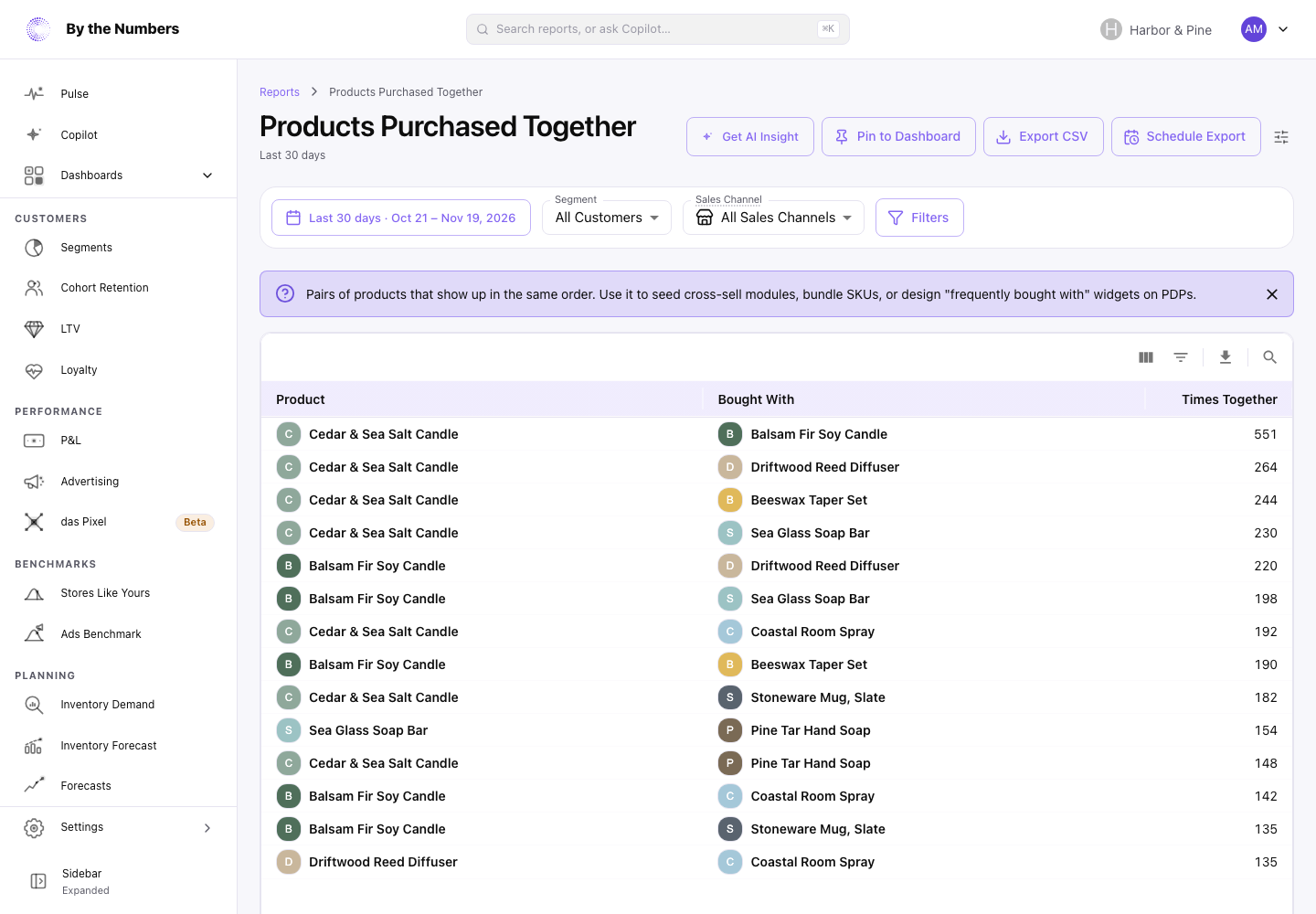
Products Purchased Together lists the pairs of products that customers buy in the same order, with the most common pairs first, so you can find bundles and cross-sells.
How It’s Calculated
Each row is a pair of different products. The columns are:
- Product and Bought With: the 2 products in the pair.
- Times Together: how many times the pair was bought in the same order in the date range.
Each pair appears once. Which product sits under Product and which under Bought With has no meaning: the report puts the product with the lower Shopify ID first. Use Product Attach Rate when you need to know which product leads to the other.
Times Together counts pairs of order lines. In most orders that is the same as the number of orders that hold both products.
If a product sits on more than one line of an order, for example in 2 sizes, each combination of lines counts. A product on 2 lines with another on 1 line counts 2 times, and 2 lines with 2 lines counts 4 times.
The table lists up to 1,000 pairs, with the highest Times Together first. A pair needs only 1 order to appear, so the lower rows are often a single order.
What Counts
- Orders that were canceled, or whose payment was voided or expired, don’t count.
- Refunds and returns aren’t taken off. A refunded item still counts as bought.
- Dates follow your store’s time zone.
- With a Segment picked, only orders from customers in that segment count. Sales Channel and Filters limit the report to matching orders.
- Items with no product in Shopify, such as custom items, aren’t paired.
This report has no Compare control, no chart and no totals row.
What Good Looks Like
There’s no target. Look at the top of the list for pairs you didn’t expect.
A pair you already promote together confirms that it works. A pair you don’t promote is an opening.
A pair of 2 bestsellers appears often because both sell often. Product Attach Rate separates those from pairs that sell together more than chance.
What to Do About It
- A pair you don’t offer together: add it as a bundle, or show each product on the other’s page.
- A pair of 2 bestsellers: check its Lift in Product Attach Rate before you build a bundle on it.
- Few pairs, all with 1 or 2 times: your customers mostly buy 1 product per order. Add-on offers can raise the items per order.
Get AI Insight at the top of the report asks Copilot for a short read of it.
Where to Find It
- Products Purchased Together: open Reports and look under Products.