Sales by Marketing Medium
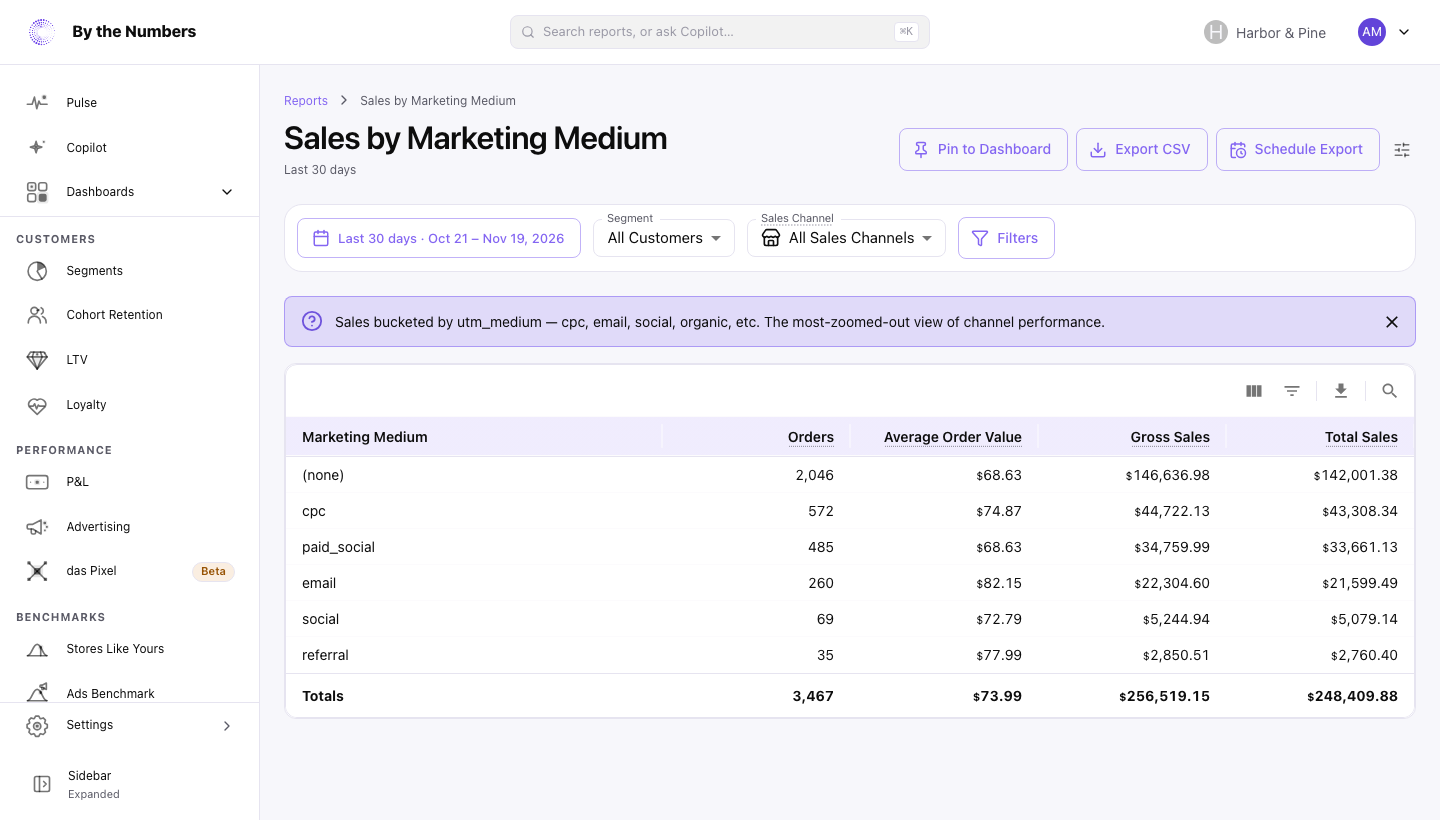
Sales by Marketing Medium shows your sales grouped by the utm_medium tag on each order, such as cpc, email or social. It tells you which kinds of marketing bring in orders.
How It’s Calculated
The table has one row for each different utm_medium on your orders in the date range, and shows the 20 with the most orders.
The columns are:
- Marketing Medium: the
utm_mediumtag, in lowercase. Orders with noutm_mediumare in the (none) row. - Orders: the number of orders placed.
- Average Order Value: the row’s sales before returns, divided by its orders.
- Gross Sales: each item’s price times its quantity, before discounts, shipping, tax and returns.
- Total Sales: Gross Sales minus Discounts, plus Shipping and Tax, minus money refunded in the date range. If your prices include tax, the tax isn’t added again.
The totals row adds up only the rows shown. If you have more than 20 mediums, it’s less than your total.
Where the Tag Comes From
Shopify records the UTM tags on the customer’s last visit before the order. Only orders Shopify can tie to a visit to your online store have them. Point of sale, phone and draft orders have none.
By the Numbers needs permission to read Shopify’s marketing events to record tags. Orders imported without it carry none. Capital letters don’t matter: Email and email count together.
What Counts
- Sales count on the day the order was placed. A refund counts on the day it was made, against the
utm_mediumof the original order. Refunds on orders placed more than 2 years before the start of the date range aren’t counted. - A refund is taken off a
utm_mediumonly if thatutm_mediumalso has orders in the date range. - Orders that were canceled, or whose payment was voided or expired, don’t count.
- Days follow your store’s time zone, and every amount is in your store’s currency.
- Sales Channel, Segment and Filters narrow the report. There’s no comparison period.
What Good Looks Like
There’s no right mix. Compare mediums on Average Order Value as well as Orders. A medium that brings fewer orders at a higher average can be worth more.
A large (none) row means many orders carry no medium tag.
What to Do About It
- A large (none) row: add
utm_mediumto the links you control. How to Tag Your Ads With UTM Parameters shows the setting for each ad platform. - A medium with a low Average Order Value: check its discounts in Sales by Discount Code.
- Which source sits behind a medium: open Sales by Marketing Source.
Where to Find It
- Sales by Marketing Medium: open Reports and look under Sales.
- Sales by Marketing Source: the same orders by
utm_source. - Sales by Marketing Campaign: the same orders by
utm_campaign. - Sales Attributed to Marketing: all tagged sales, period by period.