Sales by Currency
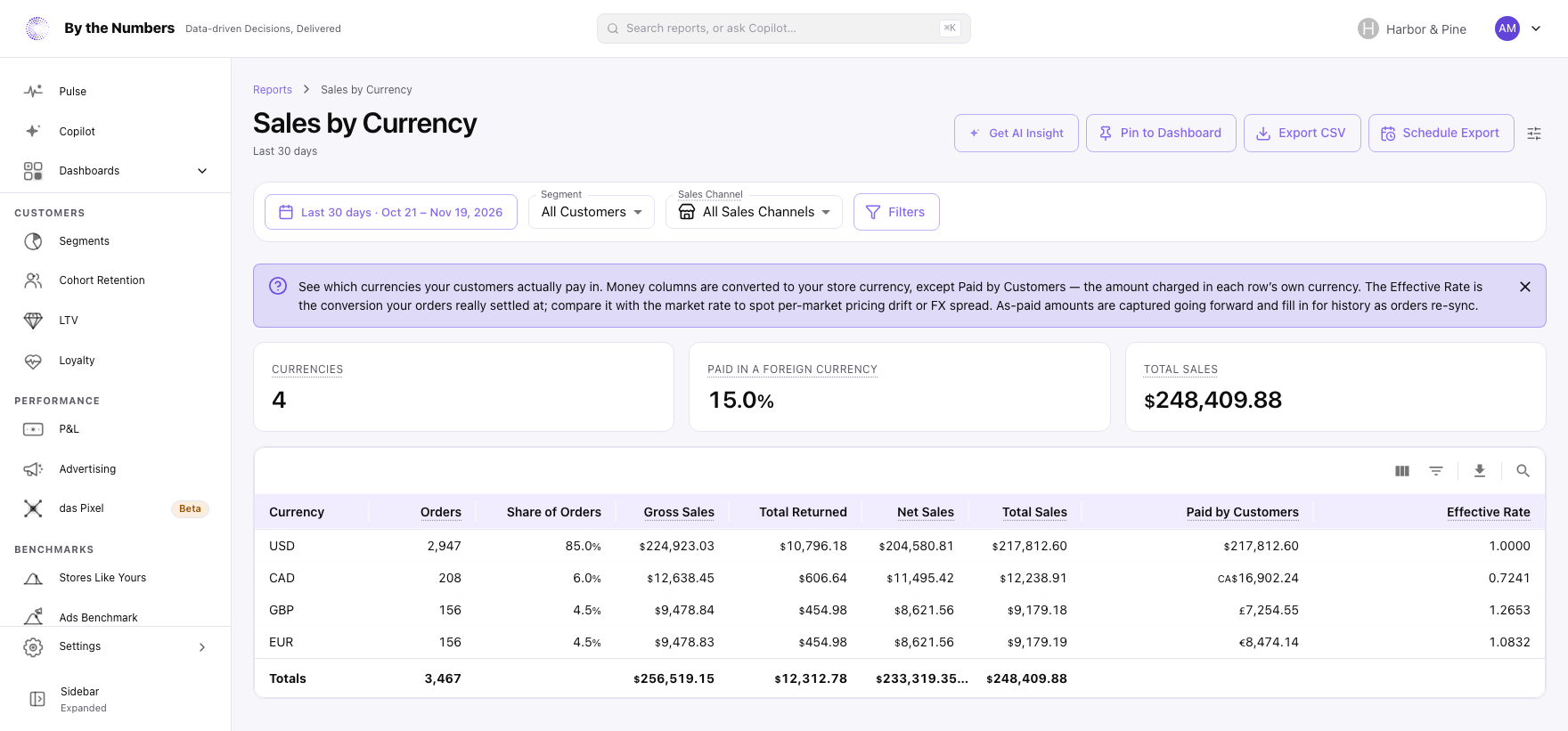
Sales by Currency shows which currencies your customers paid in, and what each one brought in for your store, in your store’s currency.
How It’s Calculated
The cards at the top show:
- Currencies: how many different currencies customers paid in.
- Paid in a Foreign Currency: the share of orders paid in a currency other than your store’s currency.
- Total Sales: the total for the date range, in your store’s currency.
The table has one row for each currency, with the one with the most orders first. A chart above the table shows the 10 currencies with the most Total Sales. A pinned dashboard card shows the same chart.
The columns are:
- Currency: the currency the customer was charged in.
- Orders and Share of Orders: the number of orders in that currency, and their share of all orders.
- Gross Sales, Total Returned, Net Sales and Total Sales: the same figures as in Total Sales, converted into your store’s currency.
- Paid by Customers: the order totals customers were charged, in the row’s own currency. Refunds aren’t taken off.
- Effective Rate: the exchange rate the orders really settled at, to 4 decimal places. It’s your store-currency total divided by the total customers paid.
Your own currency’s row has an Effective Rate of about 1. Effective Rate shows a dash when no order in the row has the as-paid amount on file.
What Counts
- An order’s currency is the one the customer was charged in. When Shopify didn’t record one, the order counts under the currency it recorded for the order, which is normally your store’s.
- Paid by Customers and Effective Rate use only orders where the amount in the customer’s currency is on file. For older orders it can be missing, so these 2 columns can cover fewer orders than the row’s other columns.
- Refunds stay in your store’s currency, so Total Returned has no amount in the customer’s currency.
- Sales count on the day the order was placed. A refund counts on the day it was made, against the currency of the original order. Refunds on orders placed more than 2 years before the start of the date range aren’t counted.
- Orders that were canceled, or whose payment was voided or expired, don’t count.
- A currency with no orders in the date range doesn’t appear, so refunds on its earlier orders aren’t counted either.
- Days follow your store’s time zone.
- Sales Channel, Segment and Filters narrow the report. There’s no comparison period.
What Good Looks Like
A store that sells in one currency shows 1 currency and 0% foreign. A store that sells abroad sees a share that grows with its international orders.
Compare Effective Rate with the market rate for that currency. A gap means your orders settled at a different rate from the market’s. The rate comes from 2 totals Shopify records on each order, one in your currency and one in the customer’s.
What to Do About It
- A large foreign share: check the prices customers see in each market, and that they match what you intend to charge.
- An Effective Rate far from the market rate: compare the prices you set for that market with your base prices.
- A currency that’s growing: check Sales by Country to see which countries pay in it.
Where to Find It
- Sales by Currency: open Reports and look under Sales.
- Sales by Country: sales by billing country, with the currencies paid in.
- Total Sales: all sales, broken into their parts.