Cohort Retention
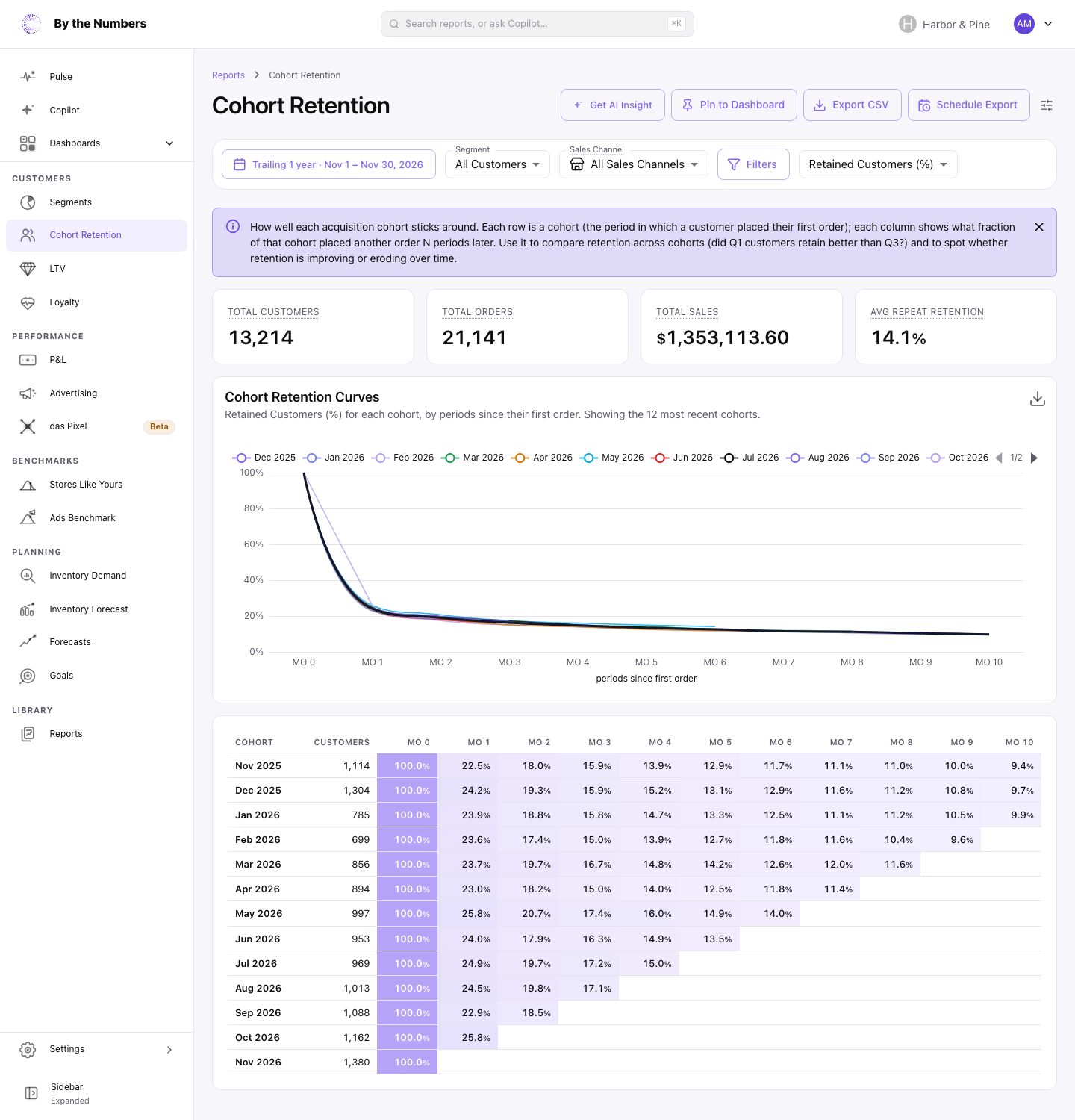
Cohort Retention shows how many of the customers you won each month came back to order again in each month after. Each row is a cohort: the customers whose first order was in that month.
How It’s Calculated
Each row starts with the cohort’s month and its size, under Customers. The columns count months since the first order: MO 0 is the month of the first order, MO 1 the month after, and so on.
With Retained Customers (%) selected, each cell is the share of the cohort who placed at least one order in that month. A customer who orders in months 1 and 3 counts in both columns, and not in month 2. A second order in the same month as the first stays in MO 0, so it never shows as retention.
Use the dropdown in the filter bar to show a different figure in each cell:
- Retained Customers (%): the share of the cohort who ordered that month.
- Retained Customers (#): the number of those customers.
- Orders: how many orders the cohort placed that month.
- Gross Sales: their sales before discounts, shipping, tax and returns.
- Total Sales: Gross Sales minus discounts and returns, plus shipping and tax.
Hover over a cell to see all of these at once, plus AOV.
What Counts
- Months follow your store’s time zone.
- Orders that were canceled, or whose payment was voided or expired, don’t count. Neither do orders with no customer.
- A customer’s cohort is the month of their first order. New customers join the grid the next time your customer data refreshes.
- With a Sales Channel or Filters set, only matching orders count. Customers then counts only the cohort’s customers with at least one matching order.
- The cohort month still comes from each customer’s first order of any kind, so with those filters MO 0 can be under 100%.
The date range picks which cohorts you see. Trailing 1 year is the default and shows the last 13 months of cohorts, including the current month.
A month in which nobody from the cohort ordered shows 0%. A blank cell is a month that hasn’t started yet. The current month is still in progress, so the newest cell in each row keeps growing until the month ends.
Refunds count in the month they were made, whether or not the customer also ordered that month. A month with refunds and no orders shows Total Sales below zero. Orders with no customer aren’t in the grid, so a cohort’s Total Sales won’t match the Total Sales report for the same months.
Summary Cards and Chart
- Total Customers: the customers in every cohort shown.
- Total Orders: every order those customers placed, first orders included.
- Total Sales: the Total Sales of those orders.
- Avg Repeat Retention: the share of customers who ordered again, across every finished month from MO 1 on.
Avg Repeat Retention adds up the customers who ordered in each of those cells and divides by the cohort sizes for the same cells, so bigger cohorts count for more. A month in which nobody came back counts as 0%. MO 0 and the current month are left out, because the current month isn’t over yet.
Cohort Retention Curves draws one line per cohort for the 12 most recent cohorts. The bold Average line covers every cohort in your date range, weighted by its size.
What Good Looks Like
With no filters, the curve starts at 100% in MO 0 and drops after it, because many customers order once and don’t come back. What matters is where it flattens. A curve that levels off shows a core of customers who keep buying month after month.
How high that level sits depends on how often your product needs replacing. Compare your store with itself over time, not with another store’s numbers.
Across a sample of 17 stores using By the Numbers, the share of customers who had ever placed 2 or more orders ranged from 6% to 72%.
Read the grid down each column to see change over time. If newer cohorts have higher MO 1 to MO 3 values than older cohorts had at the same age, your retention is improving. Growing cohort sizes mean you’re winning more new customers each month.
What to Do About It
- A low MO 1: work on the second order. Send a thank-you and a reason to come back soon after the first order. Cohort Repurchase Rate shows when customers usually return.
- One cohort much better or worse than its neighbors: look at what happened that month, such as a sale, a new product or a new ad campaign. Repeat what won customers who stayed.
- Retention falling across newer cohorts: switch the Segment dropdown between groups of customers, for example Full price Customers and Non-full price Customers, to find which ones stop returning.
- A steep drop after a few months: remind customers before they lapse. The Defecting and At risk groups on Customer Loyalty are the customers to reach.
With Filters, only orders that match count. Filter on a product to see how many customers from each cohort bought it in later months.
Where to Find It
- Cohort Retention: Cohort Retention in the navigation, under Customers.
- Cohort Repurchase Rate: the share of each cohort that came back within 30 days to 3 years.
- Understanding Product Cohort Retention: the same view, with cohorts grouped by the first product a customer bought.